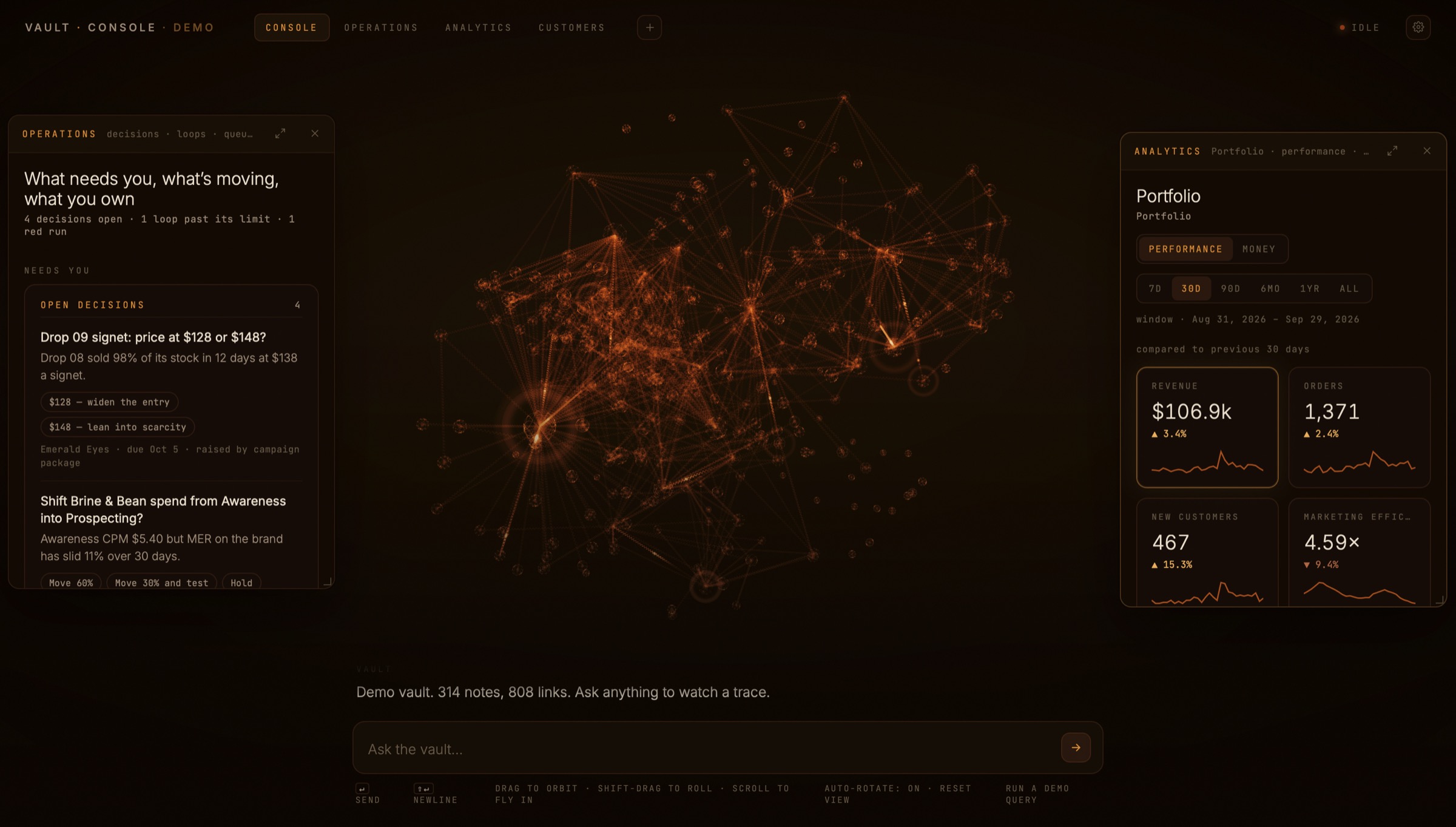
The AI operations console is the one screen where the whole system runs. You type a request, an agent reads the vault and does the job, and the answer comes back in the same window.
01 / How it works
Inside the AI operations console
The vault is a git repository of Markdown files on a Mac Mini that stays on around the clock. Claude Code runs on that machine, and it is the only thing that writes to the vault.
Skills hold the judgment calls, like how a caption should sound or how a campaign should pace a drop. So when you ask the AI operations console for a report, an audit, or a one-off campaign, the agent already knows the standards.
02 / The graph
The graph behind the chat
Every file in the vault shows up as a node, and every link between files shows up as a line. Light pulses move along those lines while the system works.
The graph has no labels and no buttons. You watch it to see the system working without reading a log.
03 / The pages
Three pages for the numbers
Operations
Reports, campaigns, open decisions, and the work queue.
Analytics
Performance and money, from top-line KPIs down to single ads.
Customers
A first-party audience builder. Set parameters, see counts, and pull lists for Meta ads.
Any page can also collapse into a floating window, so you can keep Analytics open while you talk to the console. The public demo runs on synthetic data for four sample brands, so nothing private shows up.
Back to the home page.